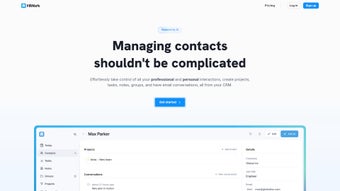

Download HiWork – AI‑Powered Personal CRM for Seamless Networking
Introduction: Why a Personal CRM Matters in 2025
In today’s hyper‑connected business environment, the ability to nurture relationships quickly and intelligently has become a decisive competitive advantage. Whether you are a freelance designer juggling dozens of client contacts, a sales executive chasing leads across continents, or a consultant who must remember key details from every meeting, a scattered spreadsheet or a generic address book simply does not cut it. That’s where a personal Customer Relationship Management (CRM) system steps in – it centralises every interaction, automates follow‑ups, and provides the context you need to stay memorable.
However, not all CRMs are created equal. Enterprise‑grade platforms are often overloaded with features you will never use, costly, and require a steep learning curve. Conversely, many free tools lack the depth and security required for professional use.
HiWork fills this gap by offering a lightweight, AI‑enhanced solution that is purpose‑built for individuals rather than large teams. It combines the simplicity of a contact manager with the strategic insight of an intelligent assistant, all while remaining fully cloud‑based and secure. Over the next sections, we will explore HiWork’s core capabilities, walk through the onboarding process, compare its strengths and weaknesses, and answer the most common questions prospective users ask.
By the end of this review you will have a clear picture of whether HiWork is the right tool to transform your networking workflow and help you close more deals, secure more referrals, and build lasting professional relationships.
What Is HiWork CRM?
HiWork CRM is an AI‑driven personal Customer Relationship Management platform built to simplify the way professionals handle contacts, tasks, and projects. Unlike heavyweight enterprise solutions, HiWork focuses on the individual user who needs a lightweight, yet powerful, tool to keep networking efforts organized and productive. The web‑based application lives in the cloud, meaning you can access your contact database from any device—whether you are on a Windows laptop, a macOS desktop, an Android phone, or an iOS tablet.
Its clean, user‑friendly interface puts essential CRM functions front and centre: you can add custom fields, group contacts, set reminders, and write private notes without the clutter of unnecessary modules. The standout feature is its AI engine, which automatically generates concise contact summaries, suggests conversation starters, and recommends follow‑up actions. This intelligent assistance helps you stay memorable and professional, even when you are juggling dozens of relationships at once.
Security is another pillar of HiWork; the service employs industry‑standard encryption, regular backups, and strict access controls to keep your personal data safe. Whether you are a freelancer, a sales professional, or anyone who values meaningful connections, HiWork CRM offers a subscription‑based solution that scales with your networking ambitions. In addition to the core features, HiWork continuously receives updates that improve AI accuracy, expand integration options, and refine the user experience, ensuring the platform remains future‑proof and aligned with evolving business needs.
Key Features & AI‑Powered Benefits
- Customizable Contact Fields: Tailor each contact record with the exact data points you need—titles, industries, last meeting notes, or even social media handles.
- Dynamic Grouping & Tagging: Organise contacts into logical groups, apply multiple tags, and filter instantly to find the right person at the right time.
- Task & Project Management: Attach tasks, set deadlines, and link them to specific contacts or groups, turning your CRM into a lightweight project hub.
- Private Notes & Follow‑Up Reminders: Jot down personal observations, meeting takeaways, and schedule automated reminders so you never miss a promised call or email.
- AI‑Generated Contact Summaries: The built‑in AI scans public data and previous interactions to produce concise summaries that you can read at a glance.
- Conversation Tips & Follow‑Up Suggestions: Using natural‑language processing, HiWork offers real‑time prompts on how to approach a contact, what topics to discuss, and when to send a follow‑up, boosting your communication confidence.
- Cloud‑Based Sync Across Devices: All data is stored securely in the cloud and synchronises instantly across browsers, ensuring you have the latest information whether you’re on a desktop or a mobile device.
- Robust Security & GDPR Compliance: End‑to‑end encryption, two‑factor authentication, and regular security audits keep your personal and professional data protected.
- Integration Ready: Export contacts as CSV, connect to calendar apps, and use webhooks to integrate with other productivity tools you already love.
- Smart Activity Tracker: Automatic logging of email opens, meeting attendances, and call durations gives you a holistic view of engagement without manual entry.
Why AI Makes a Difference
The artificial intelligence engine behind HiWork is not a gimmick; it actively reduces the cognitive load associated with networking. By automatically summarising a contact’s recent activities, pulling in publicly available information, and suggesting next steps, the AI transforms raw data into actionable insight. For example, before a sales call, the system can surface a brief bullet‑point overview: “Met at XYZ Conference 3 months ago, discussed cloud migration, expressed interest in cost‑saving solutions.” This preparation saves time, prevents awkward silences, and signals genuine interest, increasing the likelihood of a successful outcome.
Moreover, the AI learns from your interactions—if you consistently ignore certain suggestions, the algorithm adapts, refining future recommendations to align with your personal style. The AI also analyses sentiment in email threads to flag potential issues early, allowing you to intervene before a relationship deteriorates. In a world where relationship capital is a key competitive edge, HiWork’s AI assistance turns everyday networking into a strategic advantage that scales with the size of your contact base.
How to Install, Set Up, and Use HiWork CRM
Step‑By‑Step Installation
Because HiWork is a web‑based SaaS product, there is no traditional “install” process required on your computer. Getting started is as simple as visiting the official website, creating an account, and selecting a subscription plan that matches your needs. The onboarding wizard guides you through:
- Account Creation: Provide your name, email address, and create a strong password. You can enable two‑factor authentication for added security.
- Profile Setup: Upload a profile picture, set your time zone, and configure notification preferences (email, in‑app, or push).
- Import Existing Contacts: Use the CSV import tool or connect to your Google Contacts, Outlook, or Apple address book to migrate existing data.
- Define Custom Fields: Decide which data points are crucial for your workflow and create those fields before adding new contacts.
- Explore AI Settings: Adjust the frequency of AI suggestions, opt‑in to sentiment analysis, and set privacy preferences for how the AI accesses public data.
- Configure Integrations: Link HiWork to your favourite calendar, task manager, or communication platform to ensure a seamless workflow.
- Run a Demo Scenario: The system provides a simulated contact interaction so you can see AI suggestions in action before handling real data.
Operating System Compatibility
HiWork runs entirely in modern web browsers, making it compatible with all major operating systems, including:
- Windows 10/11 (Edge, Chrome, Firefox)
- macOS Monterey and later (Safari, Chrome, Firefox)
- Linux distributions with a recent Chromium‑based browser
- iOS 14+ (Safari, Chrome) – responsive mobile view
- Android 9+ (Chrome, Firefox) – responsive mobile view
Because the platform is cloud‑hosted, there is no need for separate desktop or mobile apps. However, HiWork’s responsive design ensures a smooth experience on tablets and smartphones, letting you add notes, set reminders, or check AI suggestions while you’re on the move.
Daily Usage Tips for Maximum Efficiency
To get the most out of HiWork, consider the following routine:
- Morning Review: Open the dashboard each day to see pending follow‑ups, upcoming tasks, and AI‑generated conversation tips for any scheduled meetings.
- After‑Meeting Logging: Immediately after a call or face‑to‑face meeting, add a quick note and let the AI suggest a personalised follow‑up email.
- Weekly Clean‑Up: Use the bulk‑edit feature to update stale contacts, re‑categorise groups, and archive completed projects.
- Leverage Integration: Sync HiWork tasks with your favourite calendar app so reminders appear alongside personal appointments.
- Quarterly AI Calibration: Review AI suggestion accuracy every three months and adjust settings to improve relevance for your industry.
Pros, Cons, and Frequently Asked Questions
Pros & Cons
Pros
- AI‑driven contact insights save time and improve conversation quality.
- Fully cloud‑based; accessible from any device without installing software.
- Highly customizable fields and grouping options fit diverse professional needs.
- Robust security measures, including encryption and two‑factor authentication.
- Integrated task and project management keeps everything in one place.
- Responsive design works flawlessly on mobile phones and tablets.
- Regular feature updates keep the platform modern and competitive.
Cons
- Subscription pricing may be higher than basic free contact managers.
- No native desktop app; relies on browser performance.
- AI suggestions depend on available public data, which may be limited for very niche contacts.
- Learning curve for users unfamiliar with CRM terminology.
- Advanced customization (e.g., custom workflows) is limited compared to enterprise‑grade CRMs.
- Internet connectivity required for full functionality.
FAQ – Your Most Common Questions Answered
Is HiWork CRM free to use?
HiWork offers a 14‑day free trial with full access to all features. After the trial, you need to choose a paid subscription plan (monthly or annual). There is no permanently free tier.
How secure is my data on HiWork?
Data security is a core priority. HiWork uses TLS 1.3 encryption for data in transit, AES‑256 encryption at rest, regular security audits, and complies with GDPR and CCPA regulations.
Can I export my contacts?
Yes. HiWork provides a CSV export tool that lets you download all contacts, including custom fields and notes, for backup or migration to another system.
Does HiWork integrate with my calendar?
HiWork can sync with Google Calendar, Outlook, and Apple Calendar via OAuth connections, ensuring reminders and tasks appear alongside your existing appointments.
What happens if I cancel my subscription?
Your account will downgrade to a read‑only mode at the end of the current billing period. You will still be able to view and export your data, but no new edits or AI suggestions will be generated. Data is retained for 90 days after cancellation.
Is there a mobile app for HiWork?
HiWork does not have a native mobile app at this time. However, the responsive web interface is fully optimised for iOS and Android browsers, offering the same functionality as the desktop version.
Final Verdict – Is HiWork the Right Personal CRM for You?
In the crowded landscape of personal CRM tools, HiWork distinguishes itself with a genuinely AI‑enhanced workflow that turns contact management from a clerical chore into a strategic advantage. Its cloud‑native architecture ensures you stay connected wherever you work, while the robust security framework protects the sensitive information that fuels your professional relationships. The subscription cost is justified for users who value the AI‑generated insights, task integration, and seamless cross‑device access. If you are a solo entrepreneur, a sales representative, or anyone who spends a significant portion of their day nurturing relationships, HiWork provides the right balance of simplicity and intelligence.
Ready to elevate your networking game? Download HiWork now and start the free trial. Experience firsthand how AI can help you remember details, suggest meaningful follow‑ups, and ultimately build stronger, more productive connections.



.png)



